Maths game, free now · ages 4 to 14
Maths,
one episode a day.
Your child picks a fairy-tale hero, and every right answer moves their cartoon series forward. About 15 minutes a day, always at the right level.

- No ads
- No accounts
- Works offline
During the introductory free period, everything is open on the web and in the Android app.



How it works
Start in under a minute
No sign-up: just a name (or a nickname) and an age.
Choose a hero
Nine heroes, nine series: fairy tales for little ones and missions for older kids. Each one has its own season of 10 episodes.
A short level check
Five or six tasks at the very start, and Bipo picks one of five levels: Seeker, Pathfinder, Explorer, Master or Expert.
One episode a day
About 15 minutes. Every right answer moves the story on; after a mistake, a step-by-step explanation appears.
Progress and rewards
Coins to dress up the robot, a companion that grows, and badges. Parents follow it all in the parent area.
The series
Nine heroes, nine series
Each hero has their own world, friend and story. You can switch heroes at any time, and every series keeps its own progress.
-

Liana · firefly fairy
Firefly Valley
Help Liana the fairy gather the magic light for the Festival of Lights!
10 episodes
-
Bipo · little star mechanic
The Star Workshop
Bipo the robot hunts for star gears to switch the night sky back on.
10 episodes
-

Ember · little dragon learning to fly
The Dragon Isles
A little dragon, a warm Sun Egg and a long way up to the volcano’s crown.
10 episodes
-

Milo · apprentice wizard
Moonlight Academy
A young wizard, a talking book and a magic ceiling that needs its stars back.
10 episodes
-

Marina · mermaid explorer
Pearl Reef
Help Marina the mermaid bring back the reef’s pearls and all the colors of the rainbow!
10 episodes
-

Rusty · little fox aviator
The Sky Islands
Rusty the fox cub flies his balloon to gather feathers for the Wind Compass.
10 episodes
-

Nika · deep-space scout cadet
Mission Astra
The beacons of the Astra system went dark. Plot the course and relight them!
10 episodes
-

Theo · the campus’s youngest scientist
Project Helix
Theo’s experiment sent the whole campus haywire. Time to fix it with science!
10 episodes
-

Ada · the city’s youngest detective
The Clock Tower Case
The tower clock has stopped, and strange notes keep turning up. Crack the case!
10 episodes
Voice
Stories told by a gentle storyteller
A warm, calm voice with no sharp tones: stories, hints and praise sound soft and clear, even for five- and six-year-olds. Have a listen:
Steady pace, clear diction
A little slower when she explains, a little livelier when she praises. Every line is levelled, so nothing sounds harsh.
The right stress
In Russian and Ukrainian, an 11,000-word stress dictionary makes every word sound right.
Recorded ahead, works offline
The voice is made by an offline neural model on a computer. The recordings live inside the game; nothing is sent anywhere.
- English
Liana. Help Liana the fairy gather the magic light for the Festival of Lights!
- Português
Liana. Ajuda a fada Liana a juntar a luz mágica para a Festa das Luzes!
- Русский
Лиана. Помоги фее Лиане собрать волшебный свет к Празднику огней!
- Українська
Ліана. Допоможи феї Ліані зібрати чарівне світло до Свята вогнів!
What’s inside
Much more than sums
Adapts to your child
After the level check, the difficulty adjusts with every answer: new topics, practice and review in the right mix.
115 topics
From counting to percentages and equations: numbers, the four operations, fractions, decimals, measures, time, money, geometry and more.
Reads aloud
A storyteller voices the stories in Portuguese, Russian, Ukrainian and English. In the Windows version she reads the exercises too; in the browser, the device’s voices do.
Brain games and coding
Pairs, Sudoku, Tower of Hanoi, Quick maths, Make 10 and Number crossword. Plus a robot to program, step by step.
A companion pet
A little creature your child chooses and names, which grows as they learn.
Works offline
After the first visit, the game is saved in the browser and can be installed as an app.
For parents
Everything in view, for grown-ups only
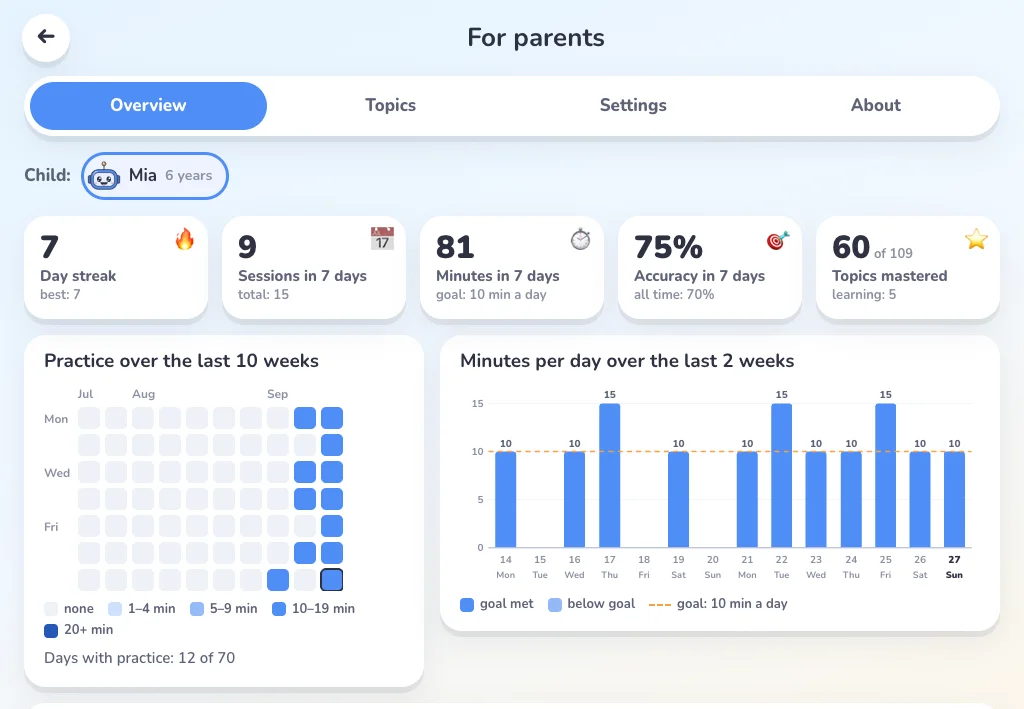
The parent area shows how long your child practised, what they have mastered and where they need help.
Daily time
Choose from 5 to 30 minutes. We suggest 10 minutes for ages 4 to 6 and 15 after that.
Progress
Minutes per day, accuracy by area, topics mastered and topics that need attention.
PIN
The parent area can be locked with a 4-digit PIN.
Safe
No ads, no chats and no links out of the game. The game is open and free during the introductory period.
Safety and privacy
Privacy is built in
No ads
No banners, no videos and no subscriptions.
No accounts
No sign-up, email or password. A name or a nickname is enough.
Nothing leaves the device
Progress is saved only on your child’s device. Progress doesn’t leave the device.
FAQ
Questions from parents
What is free in Bipo?
Right now everything in Bipo is open and free on every platform: the web version at bipo.pt/play and the Android app. Later, the full version will become one single purchase with no subscription; the level check and the first 3 episodes will stay free. Purchases will be processed by Google Play and later by the Microsoft Store. Bipo never sees card or payment data.
What ages is it for?
Ages 4 to 14. The level check and adaptive difficulty let every child start at the right point. For younger children, tasks can be read aloud.
Which devices does it work on?
The web version works in any modern browser (Chrome, Edge, Safari or Firefox) at bipo.pt/play. The Android app is in a closed test on Google Play: anyone can join the Bipo testers group and then opt in to the test. The Windows version will come later to the Microsoft Store. iPhone and iPad will come later.
Which languages?
Portuguese (from Portugal), Russian, Ukrainian and English. You can switch at any time. Tasks and stories are read aloud: in the Windows version with Bipo’s own voice, in the browser with the voices installed on the device.
Does it work offline?
Yes. After the first visit, the browser keeps a copy of the game, so it opens even without a connection. The Windows version will work offline too.
What data do you collect?
None. Progress is stored only on the device, in the browser’s or app’s storage. There are no accounts, ads or analytics, and parents can delete everything in the parent area.
How much time per day?
About 15 minutes (10 for the youngest), and parents can choose anything from 5 to 30. Brain games open after the daily session; parents can change that in the settings.
How do I see progress?
In the parent area, which opens with a PIN or a grown-ups-only question: time per day, accuracy by area, topics mastered, topics that need attention and recent sessions.
Bipo on Android
The app is in a closed test on Google Play. Anyone can become a tester for free in a couple of minutes, using the same Google account as on the phone.
- Join the testers group
Open the Bipo testers group on Google Groups and join it.
Join the group - Become a tester
Open the Google Play testing page and tap “Become a tester”.
Become a tester - Install Bipo
Install Bipo from Google Play on the phone. It can take a few minutes after step 2.
After the public launch, Bipo will be on Google Play for everyone and these steps won’t be needed.